Free for 30 days, everything included – just download and start designing.
Keep your favorite editor – Rider, VS Code or Visual Studio – and finally get a real designer next to it.
Windows 10 and 11 · .NET Framework 4.8 and .NET 8+
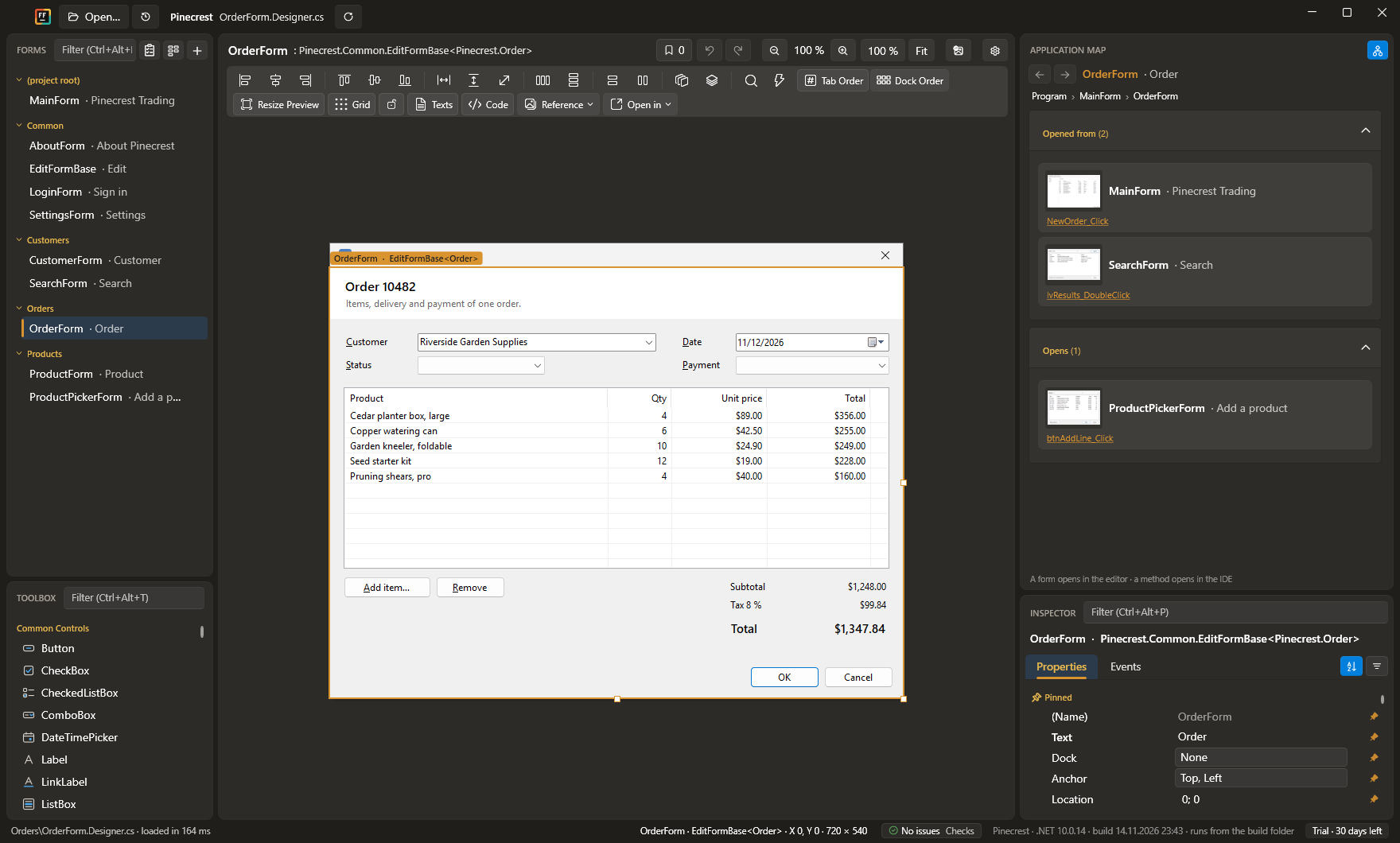
Built for real-world WinForms. Every form opens – generic, broken or ten years old – with your own controls,
third-party libraries and hand-written code just as you left them.
▦
Your whole project on one screen
Every form as a live thumbnail, grouped by folder. Spot the dialog by how it looks and open it with a click.
⇄
See how your app fits together
The application map shows which form opens which, and where in the code it happens. The fastest way into an app you have just inherited.
⌕
Find any control, in any form
Press Shift twice and type btn cancel: every Cancel button in the project, with its form. Enter takes you straight there.
Aa
Change a font everywhere at once
Give your fonts names like “Heading” or “Body”, see where each one is used, and restyle the whole project in one step.
⎘
Paste code, get controls
Designer code from another project, a blog post or an AI chat? Ctrl+V turns it into real controls on your form.
◎
The Control Ring
Hold the right mouse button and your favorite controls circle the cursor. Flick toward one and it lands right there. After a day, your hand knows the way.
⤡
See every size before your users do
Drag the form's edge and watch anchors and docking at work. Try Windows scaling from 125 to 200 % and dark mode – your code stays exactly as it is.
▤
TableLayoutPanel, finally pleasant
Size columns and rows right on the canvas, stretch a control across cells, and turn an old hand-placed form into a clean grid in one step.
✓
A second pair of eyes on every form
More than 30 checks spot overlapping controls, duplicate access keys, gaps in the Tab order and more – while you work, and in your build from the command line.
// copied from an AI chatvar ok = new Button();
ok.Text = "OK";
ok.Location = new Point(328, 13);
Controls.Add(ok);
Ctrl+V → the OK button is on your form ✓
And so much more
Clean code & Git
Treats your .Designer.cs like source code.
Clean diffs – move a button and exactly one line changes
Code with a live preview – edit the designer code, watch the form rebuild beside it
Savepoints – name a state of your form and return to it with one click, even days later
One undo step per action, even across designer file, resources and translations
Faster layout
Dock order as a list you can drag, the form follows at once
Tab order as a list you can drag, or sorted by position in one click
Label and field in one stroke, named together and aligned to the text
Property search across names and values, with pinned properties
Lock controls in place while you work around them
Every project opens
Generic forms and controls with every inherited control
Smart placeholders for controls that need a database or a running app
Linked components – edit a ContextMenuStrip or ImageList right where it is used
.NET Framework 4.8 and .NET 8+ projects, your own controls and open-source libraries
WinForms at the speed of thought.
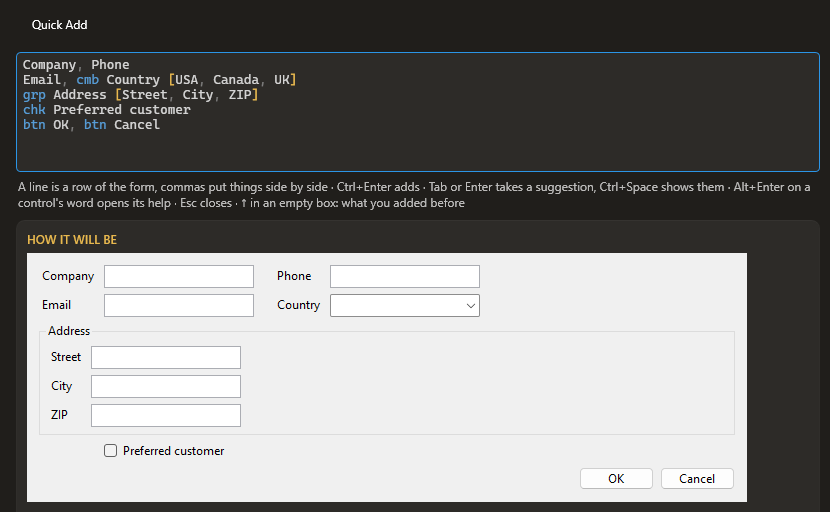
Type a few words, get a finished dialog: labelled fields, aligned columns, OK and Cancel –
named, in Tab order, one undo step. Instant, offline, the same every time.
You type Ctrl+Q
Company, Phone Email, cmb Country [USA, Canada, UK] grp Address [Street, City, ZIP] chk Preferred customer btn OK, btn Cancel
You get → a live preview, then Ctrl+Enter
And that’s just the beginning.
Every feature in every license – the only question is who pays for it.
Pay once a year. Keep what you paid for.
Public beta – join in! Licenses go on sale with version 1.0. Until then, send us feedback that helps us
improve FinallyForms – a bug, an idea, what you are missing – and get a license for a full year, free
(one per person, for the first 50 testers).
Send feedback
Start with the free 30-day trial – just download, everything is included. When you are ready, buy a license
and enter the key in the app you already have.
Perpetual fallback license: every license includes a year of updates, and the versions
released in that year stay yours – forever.
Personal
$99 first year
For individuals who pay for it themselves – freelancers welcome
All features
Renewal $55 / year
Available with 1.0
Commercial
$199 per developer
When a company pays or reimburses the license
All features, one key for all the seats you buy
Renewal $109 / year
Available with 1.0
Buying for a team? Buy as many seats as you need – they come in one key that renews in one go.
For a quote, an invoice or a purchase order, write to support@finallyforms.dev. Maintaining an open-source WinForms project? Ask us for a free license – see the Terms.
Prices without VAT. Payments, invoices and VAT are handled by Paddle, our reseller; companies enter their VAT ID at checkout.
Respects your code. Respects your time.
The WinForms designer you always wanted.
Your 15-year-old enterprise app, fast to edit again. Free for 30 days – just download and start designing.